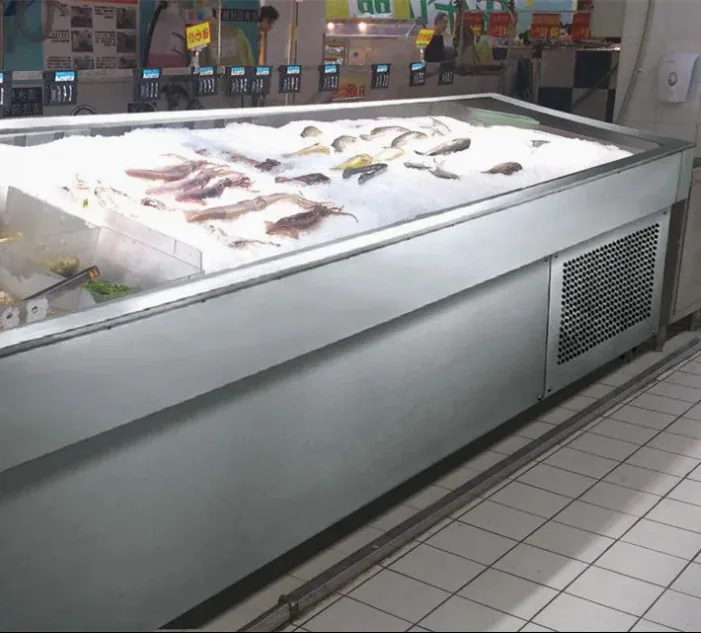
Seafood Display Cases
Commercial Seafood & Fresh Fish Display Case
Custom seafood and fresh-fish display counter for seafood markets, supermarkets and restaurants, with ice-bed presentation, drainage and configurable refrigeration.
View product →COMMERCIAL EQUIPMENT / CONFIGURATION REVIEW
Refrigerated and ice-bed seafood display formats for supermarkets, seafood markets, fish retailers, restaurants and fresh food stores. Define your display method, working space and configuration before selecting a model.

Start with the presentation and service format. These descriptions explain equipment types; they are not model listings or confirmed configurations.
A case brings together the display area, customer viewing structure and the specified cooling approach. Refrigeration and an ice bed are configuration choices that must be described in the proposal. Drainage manages meltwater where ice is used; accessible surfaces and components support the cleaning workflow. Review visibility alongside staff access so replenishment does not depend on an impractical working arrangement. Exact temperature requirements depend on the seafood type, operating method and local food-safety requirements.
Build a brief around the seafood you plan to present, the display method and the available site. Counter length is only one dimension: usable bed area, service clearance and installation access also affect the layout. Ask for a dimensioned drawing and a clear specification rather than inferring the cooling system from the case appearance.
Include your preferences in the project brief. Options are subject to technical review and confirmation for the actual equipment.
Seafood Display Cases
Custom seafood and fresh-fish display counter for seafood markets, supermarkets and restaurants, with ice-bed presentation, drainage and configurable refrigeration.
View product →Plan live holding, iced presentation and refrigerated seafood displays around the species, store footprint and service workflow of your fish market or seafood retail store.
Coordinate selected fresh seafood displays, live tanks, upright refrigerators, deli counters and island freezers within the supermarket zones you need to equip.
Custom layouts according to restaurant floor plans, with live seafood display, back-of-house holding and selected refrigeration reviewed as separate project requirements.
Choose a display format, compare equipment configurations and prepare a purchasing brief for your seafood retail project.
Turn the species list, floor plan and water-system requirements into a tank specification that can be compared and approved.
Ask for system boundaries, service access and included components instead of assuming a tank photograph defines its water system.
Compare display method, access, ice handling and utilities before choosing the counter format for your seafood assortment.
Build a zone plan covering live holding, fresh display, replenishment, service access and utilities before choosing individual modules.
Compare identified SG, LCM, BT and LDM references by application, model table and destination-market requirements instead of appearance alone.
Prepare an itemized brief that distinguishes fixed site constraints, desired options and specifications requiring technical confirmation.
Specify the actual material and component scope for the proposed counter, with project conditions reviewed before drawing approval.
BUYER QUESTIONS
A refrigerated case has an agreed refrigeration arrangement. An ice-bed case is designed around an ice presentation bed and may also include additional cooling. Confirm the actual configuration rather than treating these as exclusive labels.
Custom dimensions can be discussed. Provide a drawing, the intended counter layout and access constraints. Feasibility and final dimensions require configuration review.
There is no universal range stated here. Exact requirements depend on the seafood type, operating method and applicable local requirements. Follow applicable local food-safety regulations and product-specific storage guidance.
Provide the intended outlet location, available site connection and the planned ice-handling method. Drainage and cleaning access should be checked against the installation layout.
State the destination country, available voltage and frequency, and the required plug or connection. The actual equipment specification and destination-market documents need confirmation.
The Buyer Guide compares display formats, cooling assumptions and workflow considerations. Use it to prepare a brief, then request a configuration review for your site.
LET’S DEFINE YOUR PROJECT
Tell us the equipment type, dimensions, quantity and destination market. We can review standard catalog options or discuss a custom configuration for the project.